
WorkbenchNP2 とはWhat is WorkbenchNP2?
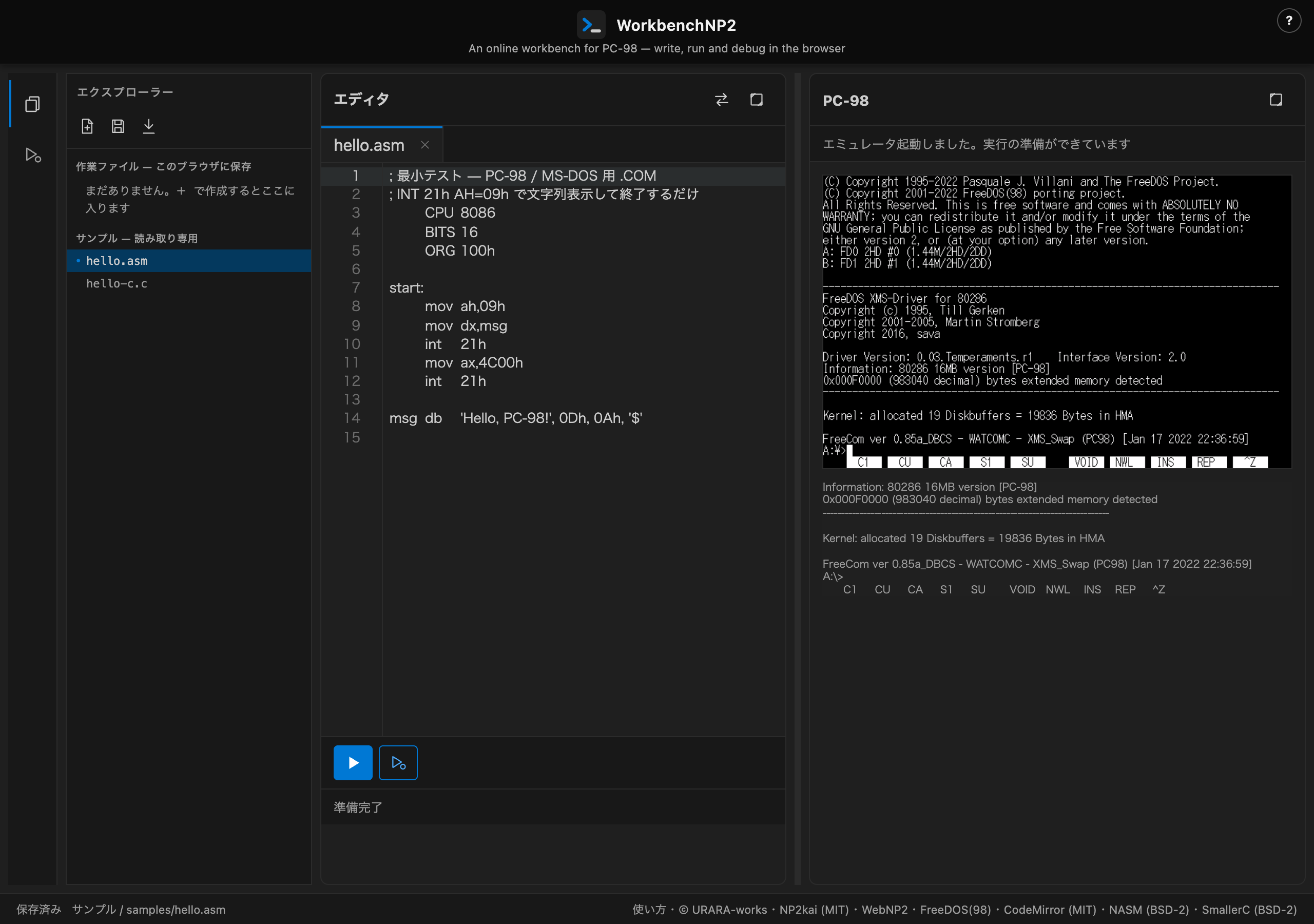
WorkbenchNP2 は、ブラウザだけで PC-98 向けのアセンブラ/C を書き、実行し、 ソース行単位でデバッグできる実験的な開発環境です。インストールも会員登録も不要で、 このページを開けばすぐに使えます。
実行基盤には NP2kai(WebNP2 として wasm 化した Neko Project II 系エミュレータ)を 使い、アセンブラには NASM、C コンパイラには SmallerC、 動作させる OS には FreeDOS(98) を使っています。書いたコードはブラウザ内で その場でアセンブル/コンパイルされ、フロッピーディスクイメージに変換されて、 すぐ隣の PC-98 画面で実行されます。
WorkbenchNP2 is an experimental development environment that lets you write PC-98 assembly or C, run it, and debug it line by line — entirely in your browser. No install, no sign-up: open this page and you're ready to go.
It runs on NP2kai (the same Neko Project II-derived emulator core used by WebNP2, compiled to wasm), assembles with NASM, compiles C with SmallerC, and boots FreeDOS(98) as the guest OS. Your source is assembled or compiled on the spot in your browser, packaged into a floppy disk image, and run on the PC-98 screen right next to the editor.
使い方How to use it
- 左のエクスプローラーからサンプル(
hello.asmなど)を開くか、 新規ファイルを作ります。 - エディタ下のツールバーの実行ボタン(▷)を押すと、ビルドして 右の PC-98 画面で実行します。
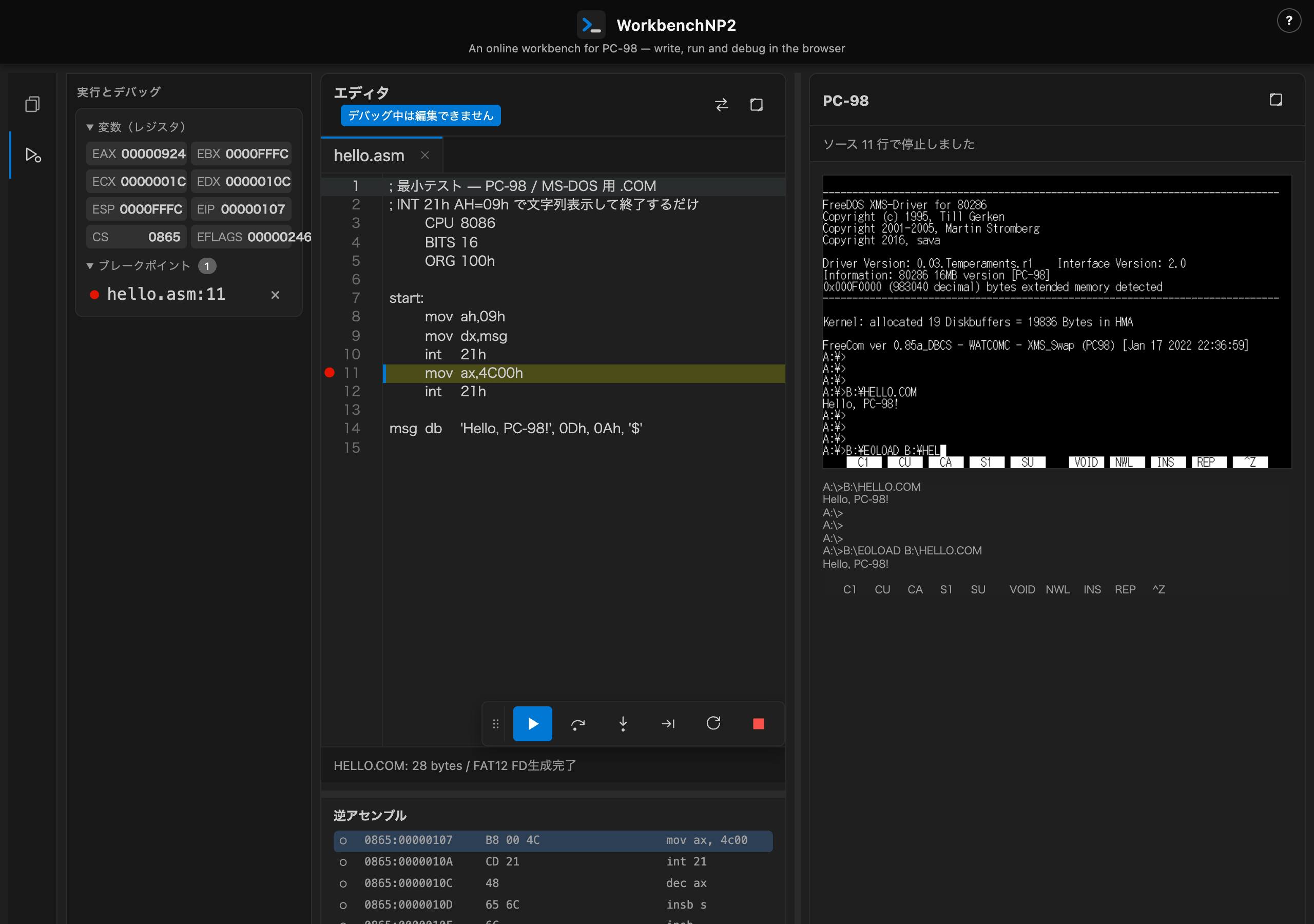
- 行番号の余白(gutter)をクリックすると、その行に ブレークポイントが付きます(付けられるのは実際にコードが生成される行だけです)。
- デバッグボタンを押すと、対象の1命令目の手前で止まった状態で デバッグを開始します。左のサイドバーにレジスタとブレークポイントの一覧が出ます。
サンプル一覧の p98lib/ で始まるもの(hello.c /
walk.c / walk2.c)は、PC-98のグラフィックライブラリ
p98lib を使ったサンプルです。他のサンプルと同じように選んで
実行ボタンを押すだけでそのまま動きます。自分のコードでp98libを使いたいときは、
先頭に #include "p98.h" と書くだけで構いません。なお
walk2.c が使う画像データのヘッダはビルド時に自動で読み込まれるため、
サンプル一覧には出てきません。p98libの使い方の詳細は
p98lib リファレンスを参照してください。
- Open a sample (e.g.
hello.asm) from the Explorer on the left, or create a new file. - Press the Run button (▷) in the toolbar below the editor to build and run it on the PC-98 screen on the right.
- Click the gutter next to a line number to set a breakpoint there (only lines that actually generate code can take one).
- Press the Debug button to start debugging, stopped right before the target's first instruction. The sidebar on the left shows registers and your breakpoint list.
The samples whose name starts with p98lib/ (hello.c,
walk.c, walk2.c) use the PC-98 graphics library
p98lib. Pick one and press Run just like any other sample and it
works right away. To use p98lib in your own code, just write
#include "p98.h" at the top. The image-data header that
walk2.c uses is loaded automatically at build time, so it does not
appear in the sample list. For details on using p98lib, see the
p98lib reference (Japanese only).
ファイルと保存Files and saving
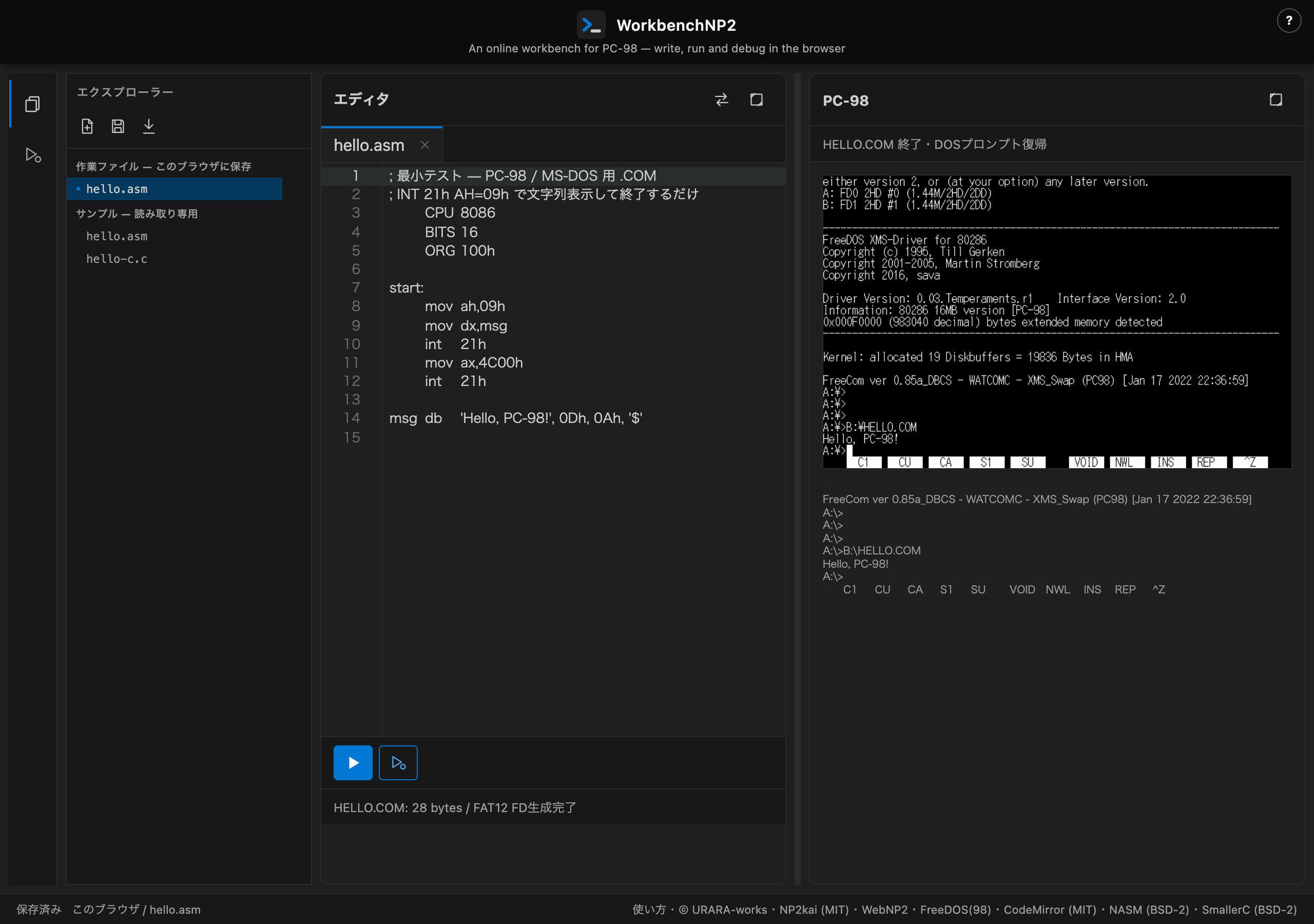
エクスプローラーは 「作業ファイル」 と 「サンプル」 の 2 グループに分かれています。
「サンプル」は読み取り専用です。編集して保存すると、サンプル自体は
書き換わらず、同じ内容が「作業ファイル」側へ複製されます
(例: samples/hello.asm を編集して保存すると hello.asm という
作業ファイルができます)。
The Explorer has two groups: "Work files" and "Samples."
Samples are read-only. Editing and saving one does not change the
sample itself — it copies the content into a work file instead (e.g.
editing and saving samples/hello.asm creates a work file named
hello.asm).
制約Limitations
- 1 ファイル=1 プログラムです。複数のファイルをまとめて 1 つのプログラムとしてビルドすることはできません。
#includeできるのは同梱の標準ヘッダのみです。 利用者が作成した別ファイルをヘッダとして読み込むことはできません。- 扱えるファイルの拡張子は
.asmと.cの 2 種類だけです。 - p98libを使うサンプル(
#include "p98.h"があるコード)は、通常のCサンプル より内部的なビルド手順が1段多いため、ビルドに時間がかかります。 - IDE上で編集できるのは自分が開いているファイル1つだけです。p98lib本体
(
p98.c/p98_asm.asm)はIDEからは編集できません。
- One file equals one program. You cannot combine several files into a single build.
#includeonly works for the bundled standard headers. A header file you write yourself cannot be included.- Only two file extensions are supported:
.asmand.c. - Samples that use p98lib (code with
#include "p98.h") go through one extra internal build step compared to a plain C sample, so building them takes longer. - The IDE only lets you edit the one file you have open. p98lib itself
(
p98.c/p98_asm.asm) cannot be edited from the IDE.
キーボードショートカットKeyboard shortcuts
次のキーが登録されています。
The following keys are registered:
| キーKey | 動作Action |
|---|---|
| F5 | 続行 — ブレークポイントまで実行する(デバッグ中のみ)Continue — run until the next breakpoint (while debugging only) |
| F10 | ステップオーバー — 次のソース行まで実行する。call は飛び越える(デバッグ中のみ)Step over — run to the next source line, stepping over calls (while debugging only) |
| F11 | ステップイン — call なら呼び先へ入る(デバッグ中のみ)Step into — enters a call's target (while debugging only) |
| Enter | 新規ファイルのポップアップで、入力した名前でファイルを作成するIn the new-file popup, creates the file with the entered name |
| Esc | 新規ファイルのポップアップを閉じるCloses the new-file popup |
| ← / → | エディタとPC-98画面の境界(スプリッタ)にフォーカスがあるとき、幅を16pxずつ調整するWith the editor/PC-98 splitter focused, adjusts the width by 16px per press |
| Home | スプリッタまたはデバッグツールバーのつまみにフォーカスがあるとき、既定の位置へ戻すWith the splitter or the debug toolbar's grip focused, resets it to its default position |
クレジットと権利についてCredits and rights
WorkbenchNP2 は次のソフトウェアを利用・同梱しています。
- NP2kai(Neko Project II 系)— MIT
- WebNP2 — NP2kai を wasm 化し、ブラウザ向けにホストする姉妹プロジェクト
- FreeDOS(98) — ゲスト OS として同梱
- CodeMirror — エディタ(MIT)
- NASM — アセンブラ(BSD 2-Clause)
- SmallerC — C コンパイラ(BSD 2-Clause)
- p98lib(PC-98向けCゲームライブラリ)— MIT、Copyright (c) 2026 URARA-works
walk2.cサンプルが使う画像データは、作者のオリジナル作品から変換したものです。
WorkbenchNP2 自身のコード(このリポジトリで書かれた部分)はリポジトリ直下の LICENSE ファイルのとおり MIT License です。 上記の同梱ソフトウェアはそれぞれの配布元のライセンスに従い、WorkbenchNP2 の MIT License によって上書きされるものではありません。
各ライセンスの詳細は、アプリ画面下部のステータスバーにあるリンクから参照できます。
PC-9801、PC-9821 は日本電気株式会社(NEC)の商標です。 本プロジェクトは NEC とは関係がなく、NEC による承認・提携・協賛を受けたものでもありません。
本プロジェクトは実行基盤として NP2kai(Neko Project II 系)を ビルドし同梱しています。NP2kai および Neko Project II の作者とも関係がなく、 公認を受けたものではありません。
WorkbenchNP2 uses and bundles the following software.
- NP2kai (a Neko Project II derivative) — MIT
- WebNP2 — the sister project that compiles NP2kai to wasm and hosts it in the browser
- FreeDOS(98) — bundled as the guest OS
- CodeMirror — the editor (MIT)
- NASM — the assembler (BSD 2-Clause)
- SmallerC — the C compiler (BSD 2-Clause)
- p98lib (a PC-98 C game library) — MIT, Copyright (c) 2026 URARA-works
The image data used by the walk2.c sample is converted from the
author's own original artwork.
WorkbenchNP2's own code (the parts written in this repository) is licensed under the MIT License, as stated in the LICENSE file at the repository root. Each bundled piece of software above remains under its own distributor's license and is not overridden by WorkbenchNP2's MIT License.
Full license texts are linked from the status bar at the bottom of the app.
PC-9801 and PC-9821 are trademarks of NEC Corporation. This project has no relationship with NEC, and is not approved, affiliated with, or sponsored by NEC.
This project builds and bundles NP2kai (a Neko Project II derivative) as its execution engine. It has no relationship with the authors of NP2kai or Neko Project II, and is not an officially endorsed derivative.